Active@ UNDELETE Ver 5.0
See documentation for latest version
Connect to Active@ Remote Recovery Agent
Using Network Edition of Active@ UNDELETE you are able to connect to Remote Recovery Agent Overview that provides recovery features through the network.
It can be done in either ways:
- The workstation can be selected from drop-down list of neighbour computers located at the top of Explorer Tree Pane.
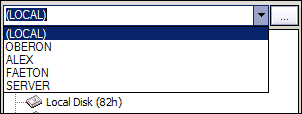
- Type computer name or computer IP address in combo box text field and press ENTER to connect to.
- Click Browse for computer button located on right side of neighbour computers drop-down list, to open Browse for computer dialog.
- Click Actions > Connect... on the command toolbar to open Browse for computer dialog.
If Active@ Remote Recovery Agent is running on the selected computer and it has
Enabled status, then the connection will be established and you can scan and browse the file system of remote machine.

