Active@ Undelete - Data Recovery Software

Home

Products

Support

Partners

Contacts

Documentation - Find and Restore deleted files

Search Results View


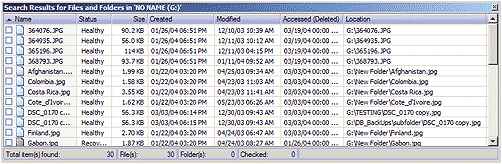
This view is using for review search result after performing the search under selected context.
Search

There are two types of search:

Simple Search for Files and Folders
Navigation context can be search for Files and Folders by entering searching criteria in text field Look for: located in Search Bar then clicking Search in button in toolbar to initiate search process.
Advanced Search
This search, uses more options such as Creation Date, Size, Registered File Type and more, as searching criteria for searching.

After search has been made, the search result appears in the list in Search Results View. These founded Files and Folders can be viewed for more details or opened in File Preview. They also can be recovered one by one or you can checked desired files or folders and then apply recovery for them.

Note Note

If searched drive was not scanned before, the drive will be scanned using Simple Scan before searching.


See Also

Active@ UNDELETE Explorer Tool Views | Files and Folders Recovery | Advanced Search dialog | File Preview

Previous < Contents > Next


Undelete
Download Now
Buy Now


Home |  Partners  |  Order  |  Products |  About Us

Active@ UNDELETE © 1998-2010 Active@ Data Recovery Software