Active@ UNDELETE ver. 7x
See documentation for latest version
The information in this chapter can be used for either a physical device scan or for a logical drive or partition scan.
After you have completed a device scan, a Scan Results branch appears in the Recovery Explorer tree. Detected partitions are listed in order of their certainty.
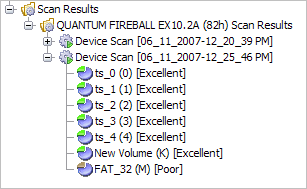
There are 12 attributes that define a partition. In some cases, the application cannot be certain that the found item actually is a partition. The rating in the order of certainty depends on how many attributes are found and what condition they are in.
You may perform the following actions on partitions in the Scan Results branch:

