Active@ UNDELETE Ver 5.0
See documentation for latest version
Files and Folders Recovery
The recovery procedure begins with confirmation dialog, where recovery options can be specified.
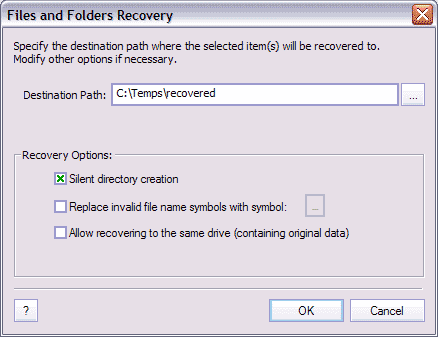
- Destination Path
- Here you can specify the destination path where selected file(s) or Folder(s) can be recovered. This path will be remembered for later use and can be also changed in Options dialog.
Recovery options
- Silent Directory creation
- With this option on, directory created with no confirmation dialog.
- Replace invalid file name characters.
- With this option on, you will be able to enter character, using to replace invalidcharacter in file or folder name, such as:
\ / : * " < > |
during the recovery process.
- Allow writing on the same drive with source item.
- With this options on, recovery one same drive is enabled. We strongly recommend to DO NOT USE this options unless necessary
Recovering encrypted files
Active@ UNDELETE allow to recover encrypted files in a same way as other files. To successfully recovery encrypted files there are few prerequisites:
- You have to have administration rights on the machine or at least have owner rights on file you going to recover;
- The destination folder where file is going to recover should be located on NTFS drive. If in some reason, you cannot use NTFS drive, you can save recovered file on FAT drive and complete recover procedure later using special feature Recover encrypted files using FAT

