Recover Files and Folders from Deleted Partitions?
In most of scenarios, to recover your data from deleted partition you need:
- Scan Hard Disk to find deleted partition, and if it’s found then
- Scan detected partition for Files and Folders and then
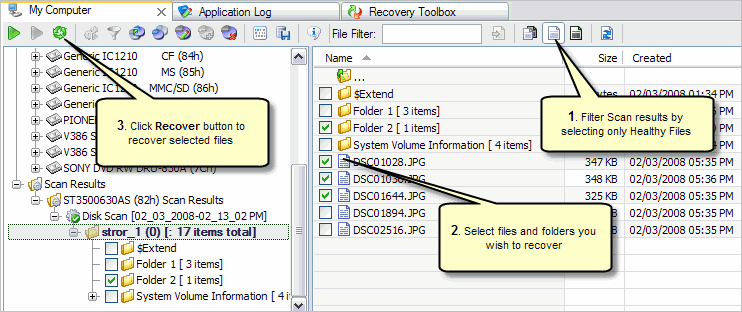
- Select (filter only Healthy files, if deleted files are not in your interest) and recover files you need.
Scan Hard Disk for Deleted Partitions
If partition was deleted the space on disk becomes “Unallocated”. You can scan this space to find deleted partition and retrieve data from it or even restore it back (See How to Restore Deleted Partition?).
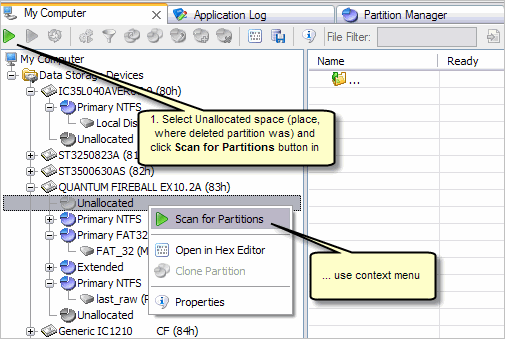
You can try to find deleted partition even if this partition has been overwritten
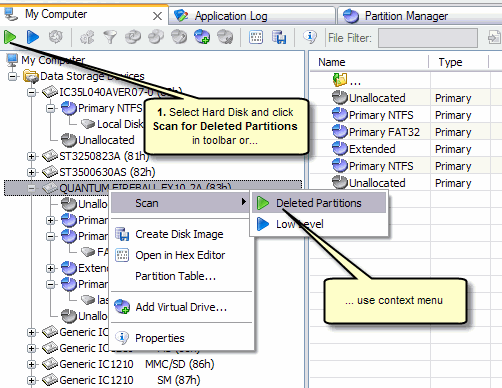
by another partition and still have a good chances to recover your data from it. In this case, you have to select Hard Disk to scan.
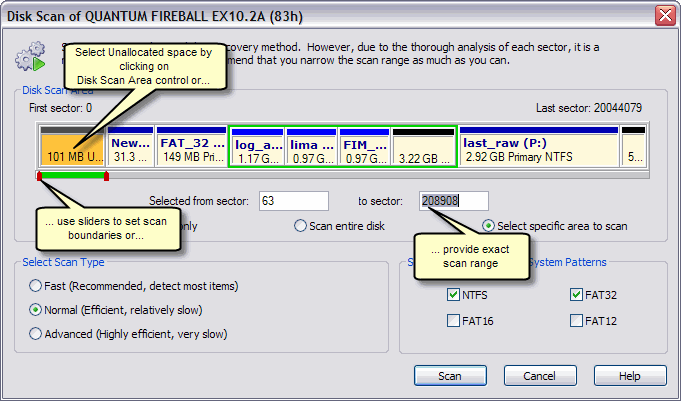
Specify Scan Options and Run the Scan
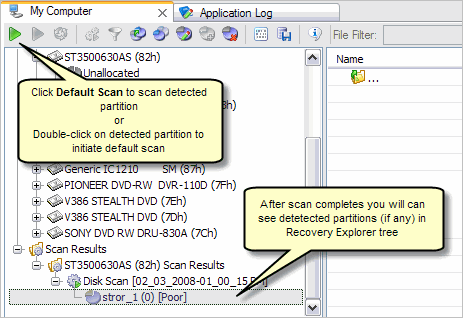
Scan Detected Partition for Files and Folders
Recover Files and Folders
See Also:
How to Recover Deleted Files and Folders? |
How to Restore Deleted Partition?

